Marathon tracking apps compared (2026): follow a runner live
Official race apps, Strava Beacon, Garmin LiveTrack, Find My and Cheerlify compared: what supporters see, what runners need, and which to use when.
In this article
Someone you care about is running a marathon, and you want to know where they are. There are five kinds of tool for that, and each one answers a different question. The official race app knows when your runner crossed a timing mat, a watch or phone knows where they are right now, and a location share knows roughly where the phone is. This guide compares all five, ours included, and finishes with which one to use when.
The short answer: use the official race tracking for verified splits, plus one continuous GPS tracker for the gaps between the mats. Which GPS tracker depends on what the runner already carries, and on whether you want to do more than watch.
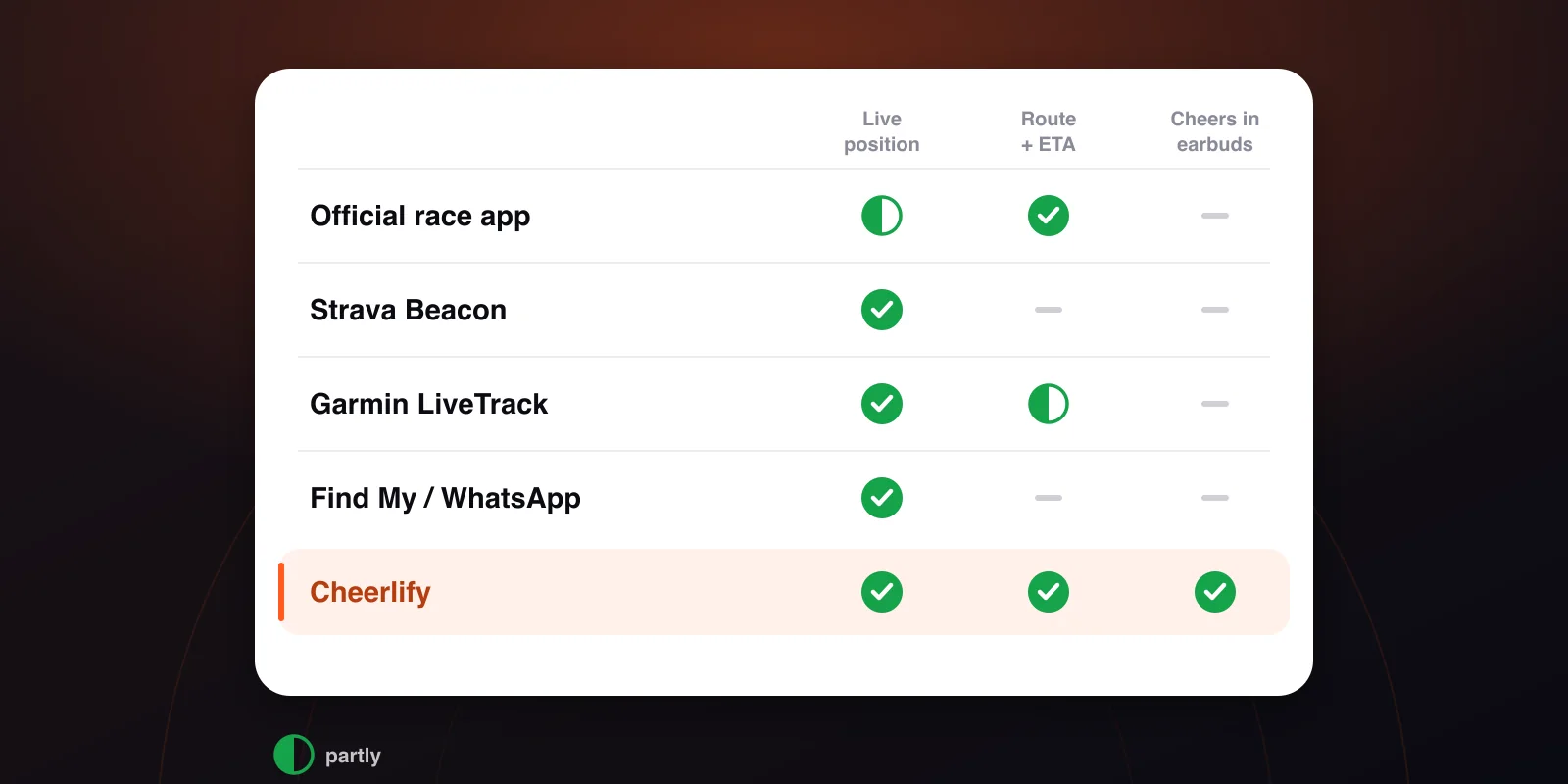
The comparison at a glance
| What the supporter sees | Supporter needs | Runner needs | Cost | |
|---|---|---|---|---|
| Official race app (RTRT.me, race apps, timing sites) | splits at timing mats, estimated position between them, predicted finish | the race's app or website | just the bib chip | free |
| Strava Beacon | live location and track, phone battery | an SMS link, browser (max. 3 people) | Strava app on the phone | free from the phone; subscription when sent from a watch |
| Garmin LiveTrack | live location, pace and other stats | a link by email or message, browser | a compatible Garmin watch paired with a phone | basic LiveTrack free |
| Find My / Google Maps / WhatsApp | a single dot, no running stats | Apple ID / Google link / WhatsApp | location sharing switched on | free |
| Cheerlify | live dot on the race route, distance, pace, ETA, plus voice and video cheers | a link and a code, any browser, no account | the Cheerlify app on the phone | tracking free; packs for more viewers and cheers |
Every GPS option needs the runner to carry their phone, and the phone to be online. None of them works from a watch alone, without a phone or LTE.
1. The official race tracking
Every big marathon has one. Timing mats read the chip on the bib (usually every 5 km, plus halfway), and the race app or results site turns that into splits, a pace and a predicted finish. Providers like RTRT.me build a separate app for each race; other races use the timing company's website. You search by name or bib number.
The times are official and verified, and it works whatever the runner carries, even with no phone at all. You can follow several runners in one app, and many races send a push notification at each mat.
The weakness is that between two mats nobody knows where the runner is. The dot on the course map is an estimate based on the last split. If your runner slows down, stops or walks through a feed station, the dot keeps moving anyway, and you only find out at the next mat, 25–35 minutes later. We've written separately about why a tracker seems frozen and chip timing vs GPS.
It also only exists where the organiser pays for it. Smaller races often post results after the finish and show nothing live.
2. Strava Beacon
Beacon shares the runner's live location with up to three safety contacts. They get an SMS link that opens in a browser, so they don't need a Strava account. It updates roughly every 15 seconds and also shows the phone's battery level.
Many people miss that Beacon is free only when the run is recorded in the Strava app on the phone. Sending Beacon from a connected watch (Garmin, Apple Watch) needs a Strava subscription.
Strava built it as a safety feature, not for spectators. Three contacts see a location and a trail, but there's no race route, no distance along the course and no finish estimate. It's perfect for "is she OK and roughly where", and less useful for "when will she reach the bridge where I'm standing".
3. Garmin LiveTrack (and COROS)
If the runner races with a Garmin, LiveTrack is the obvious choice. The watch pairs with the Garmin Connect app on the phone, the phone provides the connection, and supporters get a browser link by email or message. They see the location, pace and other stats, plus the planned course if the runner loaded one.
Basic LiveTrack is free. Garmin's paid Connect+ tier adds conveniences such as an automatic SMS when the activity starts. Check the settings before race day, because the most common failure is that auto-start was off and nobody got a link.
COROS has a similar Live Tracking link, which you can set up in advance with the route uploaded.
It has the same limitation as Beacon: it's a stats page for people who already care about stats, and nothing goes back to the runner.
4. Find My, Google Maps, WhatsApp
This needs no setup: the runner shares their location with you the way they would on any other day.
- Apple Find My / Messages: share for an hour, until the end of the day, or indefinitely. Both sides need Apple devices.
- Google Maps: real-time location and battery. Link sharing works for people without a Google account, for up to 24 hours.
- WhatsApp live location: 15 minutes, 1 hour or 8 hours. Pick 8 hours, because 1 hour runs out before the halfway mark.
What you get is a dot, with no pace, distance or route, and nothing to tell you when they'll pass you. That's plenty for a 10K. At a marathon, doing the maths in your head on a crowded pavement gets old fast.
5. Cheerlify
Full disclosure: this one is ours. Cheerlify is GPS tracking designed around the people watching a race, and it's the only tool on this list where information goes both ways.
Supporters see the runner's dot matched to the race route, so it stays on the course even when the GPS signal bounces between buildings. Next to it they get distance covered, current pace and estimated arrival at each kilometre and at the finish. All they do is open a link and enter a code and their name, in any browser. No app, no account.
The part only Cheerlify does: supporters record a voice or video cheer that plays in the runner's earbuds mid-race, either right away or at a kilometre they pick ("play this at 32 km"). The runner's music ducks, the message plays, and the music comes back. Only the runner hears the cheers; other supporters don't.
The runner needs the Cheerlify app on their phone, started before the gun. It runs with the screen locked, and in our own measurements it used 0.6–0.8 % battery per km.
Its limits: it isn't official timing, so use it alongside the race app rather than instead of it. Like every GPS option, it needs the phone on the runner. Tracking is free for up to 3 live viewers at a time, and every account starts with 3 free cheers. Bigger groups and more cheers need a per-race pack; the pricing page has the details.
Which one should you use?
You're at the course and want to see them go past. Use the official app for the splits, plus a GPS tracker that gives an arrival estimate for your spot. That estimate means you wait five minutes on the bridge instead of forty.
You're at home, maybe in another country. Any GPS option will show you where they are. If you want them to hear you as well as be watched, that's what Cheerlify was built for.
Grandma wants to follow too. Choose something with a browser link and no account: Beacon (if you're one of the three), LiveTrack or Cheerlify. Avoid anything she'd have to install on race morning.
The runner hates carrying a phone. Then you're down to the official app, or a watch with LTE. Everything else depends on the phone.
It's a small race with no live results. GPS is your only live source, so set it up the evening before and test the link together.
A race-week checklist
- Get the bib number and wave start time.
- Install or bookmark the official tracking and find the runner in it before race day.
- Pick one GPS tracker, send the link to the supporters, and test it the evening before.
- The runner starts tracking before reaching the start corral, not at the gun, when there's no signal and no spare hand.
- Agree on a meeting point outside the finish area.
Frequently asked questions
What is the best marathon tracking app?
For verified times, the race's official app. For live position between the timing mats, a GPS tracker running on the runner's phone or watch. Most supporters are best off using both.
Can I track a marathon runner without them having an app?
Yes, through the official race tracking, which only needs the bib chip. You'll get splits at the timing mats and an estimate in between, not their actual position.
Is Strava Beacon free?
Yes, when the run is recorded in the Strava app on the phone. Sending Beacon from a Garmin or other watch needs a Strava subscription. Beacon is limited to three contacts.
Why does the official tracker show my runner somewhere they aren't?
Between two timing mats the official app estimates the position from the last split. If the runner changes pace, the estimate drifts until the next mat corrects it.
How much battery does live GPS tracking use?
It depends on the app. Cheerlify used 0.6–0.8 % per km in our tests, which comes to 25–34 % over a marathon. Start with a full charge and switch off low-power mode, which can pause background location.
Follow your runner live — and be in their ears.
Cheerlify shows your runner's live position on the course map and plays your voice cheers in their earbuds mid-race. Supporters need no app and no sign-up.
Keep reading

Frankfurt Marathon 2026: tracking, the Mainzer Landstraße and the Festhalle finish
25 October 2026: official tracking with timing at every km, live GPS, where to watch twice in the city centre, and a voice cheer at km 31.
9 min read →
Dublin Marathon 2026: tracking, Heartbreak Hill and where to cheer
25 October 2026: the official race tracker, live GPS between the timing mats, the support zones, and how to be in their earbuds on Roebuck Road.
9 min read →
What to say to a runner: 30+ cheers for every stage
The one page to open before you record your first cheer.
2 min read →